Dental Website Schema Markup: Dentist and LocalBusiness Explained
Schema markup is code you add to a dental website that tells search engines exactly what the page is, using a shared vocabulary from Schema.org. For dentists, the most useful types are Dentist and LocalBusiness, which describe the practice, its location, hours and services. Schema is not a direct ranking factor, but it helps Google understand the site, can win rich results, and makes pages easier for AI search to read and cite.
Introduction
Search engines read a webpage as text, and they guess at its meaning. Schema markup removes the guesswork. It labels the parts of a page in a language search engines understand, so Google knows a phone number is a phone number, an address is an address, and a practice is a dentist.
For a dental website, that clarity pays off in better understanding, richer search listings, and a stronger chance of being picked up by AI answers. This guide explains what dental schema markup is, which types matter, how to add it, and the mistakes to avoid. It includes a working example you can adapt for your own practice, so you can see exactly what the code looks like rather than just reading about it.
What Is Schema Markup?
Schema markup, also called structured data, is code that describes the content of a page in a standard format. It uses a shared vocabulary maintained at Schema.org, which both Google and other search engines recognise.
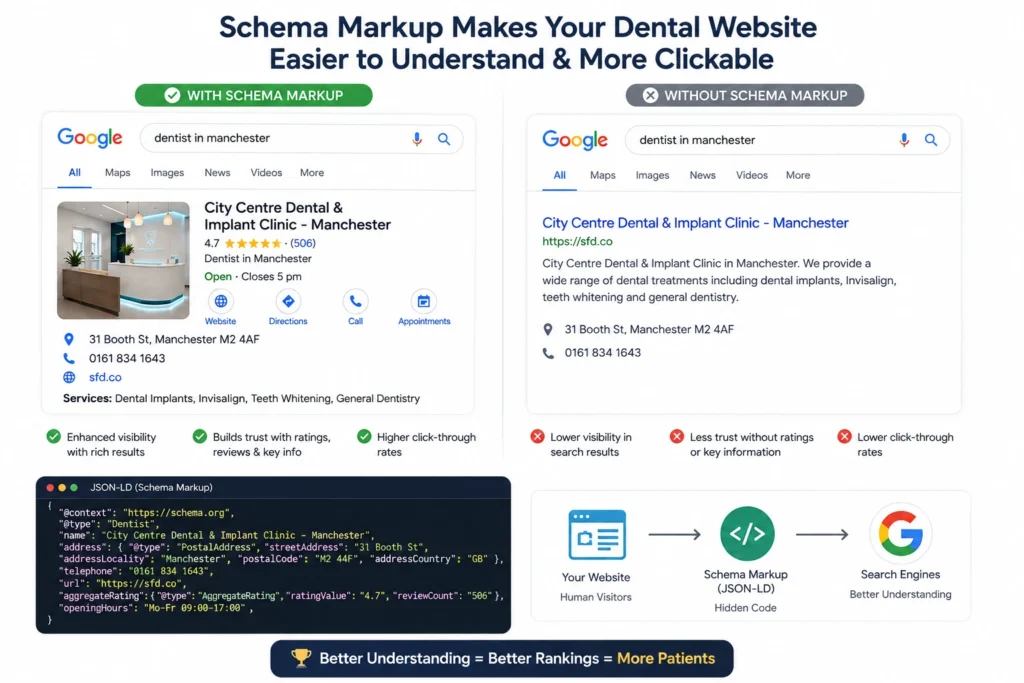
The point is simple. Without schema, Google reads your page and infers what it means. With schema, you tell it directly: this is a dental practice, here is its name, address, phone number, opening hours and the treatments it offers. That clarity is the foundation of good website SEO, because a search engine that understands a page can rank and display it more accurately.
The preferred format for adding schema is JSON-LD, a block of code placed in the page’s HTML. It sits in the background, invisible to visitors, and speaks only to machines. This is different from the content patients read, which is why a page can look identical before and after schema is added while communicating far more to search engines.
Why Dental Websites Need Schema Markup
Schema does not directly push a dental site up the rankings. Google has been clear that structured data is not a ranking factor on its own. Its value is indirect but real, and it works in three ways.
- Understanding. Schema helps Google correctly identify the practice, its location and its services, which supports relevance.
- Rich results. Correct schema can earn enhanced listings, such as FAQ dropdowns or business details, that stand out in search.
- Trust and accuracy. Clear, consistent data reduces the chance of Google getting the practice’s details wrong.
Because the signals schema clarifies overlap with the ones Google uses to rank, it supports visibility even without being a ranking factor itself. Put simply, schema does not make a weak page rank, but it helps a good page be understood and displayed at its best. The full picture of how those signals fit together is covered in the guide to how Google ranks dental websites.
Schema Markup and AI Search
Schema has become more valuable as AI search has grown. Tools like Google AI Overviews, ChatGPT and Perplexity read pages to answer questions, and structured data makes a page easier to parse and trust.
When a page clearly labels its content, an AI system can extract the right information with more confidence. A practice that marks up its treatments, location and FAQs gives AI tools clean, reliable data to pull from. This is one reason schema pairs so well with optimising for AI search, where being understood clearly is half the battle. Google has said special schema is not required to appear in AI features, but accurate structured data still helps a page be understood correctly.
The Key Schema Types for Dental Websites
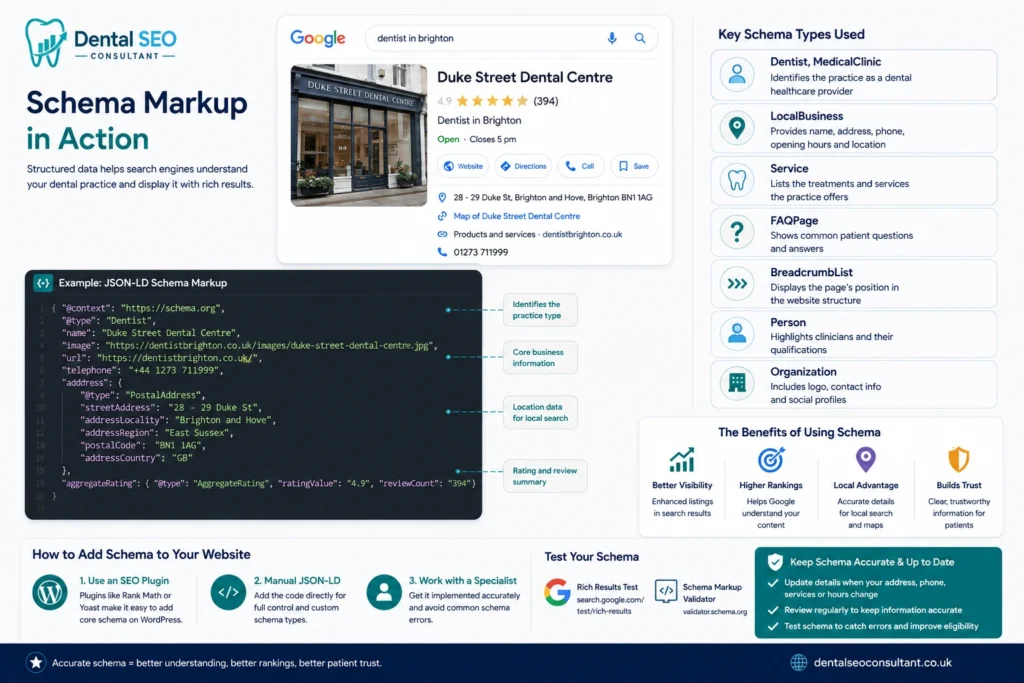
Schema.org has hundreds of types, but a dental practice only needs a handful. The table below shows the ones that matter and what each describes.
| Schema type | What it describes |
|---|---|
| Dentist | The practice as a dental provider, a recognised type |
| LocalBusiness | Name, address, phone, hours and location |
| MedicalClinic | The practice as a healthcare provider |
| Service | Individual treatments the practice offers |
| FAQPage | Questions and answers on a page |
| BreadcrumbList | The page’s position in the site structure |
| Person | A named clinician and their credentials |
| Organization | The practice as an entity, with logo and profiles |
The Dentist type is the most specific and important, as it identifies the practice for what it is. LocalBusiness data is what feeds accurate details into local search, which is why schema supports local SEO as well as the main site.
A Note on Review and Rating Schema
Review and AggregateRating schema can show star ratings in search, which is tempting. Two cautions apply. First, Google restricts star rich results for reviews a business collects and displays about itself, so self-serving review schema often does not show stars. Second, and more importantly for dentists, review data must be genuine. Fake or incentivised reviews are illegal under UK consumer law, so review schema must reflect real, honestly earned reviews only.
Which Dental Pages Need Which Schema?
Not every page needs the same markup. Matching the schema to the page keeps it accurate and useful. The table shows a sensible setup for a dental website.
| Page | Recommended schema |
|---|---|
| Homepage and contact | Dentist, LocalBusiness, Organization |
| Treatment pages | Service, with MedicalClinic context |
| Blog articles | Article or BlogPosting |
| Pages with a FAQ section | FAQPage |
| Team and clinician pages | Person, with credentials |
| Every page | BreadcrumbList |
The key rule is that schema should only describe what is genuinely on the page. FAQ schema belongs on pages with a visible FAQ, Service schema on treatment pages, and Person schema where a clinician is actually featured. Matching markup to real content is what keeps it within Google’s guidelines.
A Dentist Schema Markup Example
Here is a simplified JSON-LD example for a dental practice. It combines the Dentist and LocalBusiness details into one block. Replace the placeholder details with the real ones, and place it in the page’s HTML.
{
  "@context": "https://schema.org",
  "@type": "Dentist",
  "name": "Example Dental Practice",
  "image": "https://www.example.co.uk/logo.png",
  "@id": "https://www.example.co.uk",
  "url": "https://www.example.co.uk",
  "telephone": "+44 20 1234 5678",
  "address": {
    "@type": "PostalAddress",
    "streetAddress": "1 High Street",
    "addressLocality": "Guildford",
    "postalCode": "GU1 1AA",
    "addressCountry": "GB"
  },
  "geo": {
    "@type": "GeoCoordinates",
    "latitude": 51.2362,
    "longitude": -0.5704
  },
  "openingHours": "Mo-Fr 09:00-17:00",
  "priceRange": "££"
}
The exact details must match what appears on the page and across your listings. Consistency between your schema, your website and your directory listings is what makes it trustworthy.
How to Add Schema to a Dental Website
There are three practical ways to add schema, depending on how the site is built and who is doing the work.
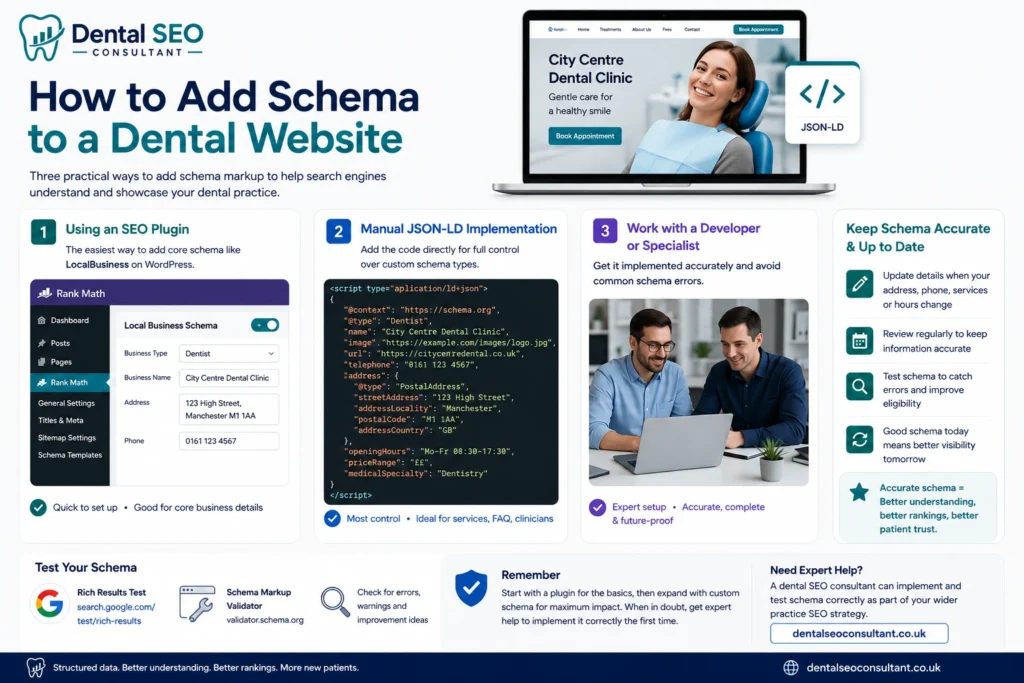
- An SEO plugin. On WordPress, plugins like Rank Math or Yoast can add core schema, including LocalBusiness details, with minimal code.
- Manually in JSON-LD. Adding the code directly gives the most control and is best for custom types like individual services or clinician profiles.
- Through a developer or specialist. For accuracy and to avoid errors, many practices have it set up properly once.
A plugin is the easiest starting point, but it usually handles only the core LocalBusiness details. Custom markup, such as schema for each treatment, individual clinicians, or FAQ sections, often needs to be added by hand or by someone who knows the standard well. The trade-off is control and completeness against time and technical skill.
Whichever route you take, the schema has to be accurate and kept up to date. A practice comfortable with the basics can start with a plugin, while more advanced markup is part of a wider practice SEO setup. If it feels beyond the practice’s time or skill, a dental SEO consultant can implement and test it correctly. Google’s own structured data guidance is the reference for how each type should be used.
Schema, Local SEO and NAP Consistency
Schema is closely tied to local SEO, because LocalBusiness data carries the practice’s name, address and phone number. Those details must match everywhere: the website, the schema, and every directory listing.
If the address in your schema differs from the one on your Google Business Profile, you send Google mixed signals. Accurate, consistent schema reinforces the same details Google uses to place a practice in local results, so it works alongside citations and the profile rather than separately. Getting this consistency right supports the whole local picture.
Common Schema Markup Mistakes
Schema helps only when it is done correctly. Done badly, it can be ignored or even cause problems. The frequent mistakes are:
- Invalid code, with syntax errors that stop Google reading the schema at all.
- Markup that does not match the page, such as details in the code that differ from the visible content, which breaches Google’s guidelines.
- Fake or exaggerated review schema, which is both against Google’s rules and, for reviews, against UK law.
- Marking up content that is not there, like an FAQ schema with no visible FAQ on the page.
- Forgetting to update it, so the schema shows an old phone number or address after a change.
Avoiding these matters because inaccurate schema can undermine trust rather than build it. Accuracy and a match with the visible page are the rules that keep it safe. These sit alongside the other technical fundamentals that decide whether a practice ranks in the map pack and beyond.
How to Test Your Dental Schema Markup
Never assume schema is working. Test it after adding or changing it, using free tools.
- Google’s Rich Results Test checks whether a page is eligible for rich results and flags errors.
- The Schema Markup Validator at Schema.org checks the code against the standard.
- Google Search Console reports on structured data issues across the whole site over time.
Run a page through these after any change. They catch the syntax errors and mismatches that quietly stop schema from working, so you know it is doing its job rather than sitting broken.
Where Schema Fits in the Bigger Picture
Schema markup is one piece of a dental website’s technical foundation, not a standalone fix. It supports understanding and rich results, but it works best on a site that is already well built, fast and full of genuinely useful content.
Think of it as clarifying a strong site rather than rescuing a weak one. It belongs alongside the fundamentals covered in what dental SEO involves, and it appears as a technical item in the wider local SEO checklist. A practice that has the basics right and then adds accurate schema gives Google every reason to understand and trust it. On its own, schema will not transform a site, but as the finishing layer on solid content and clean technical foundations, it helps a practice get full value from the work already done.
FAQ
What is schema markup for a dental website?
Schema markup is code added to a dental website that describes its content to search engines, using the Schema.org vocabulary. For dentists, it identifies the practice as a Dentist and a LocalBusiness, and describes details like address, phone, hours and services. It helps Google understand the site and can earn richer search listings.
Does schema markup help dental SEO?
Indirectly, yes. Schema is not a direct ranking factor, but it helps Google understand a page accurately, can win rich results that improve visibility, and makes content easier for AI search to read and cite. Because it clarifies the signals Google already uses, it supports SEO even though it does not push rankings up by itself.
What schema types should a dentist use?
The most important are Dentist and LocalBusiness, which describe the practice and its details. Useful additions include MedicalClinic, Service for treatments, FAQPage for question sections, BreadcrumbList for structure, and Person for named clinicians. A practice rarely needs more than a handful of well-chosen types.
Can I add schema to my dental website myself?
Yes, to an extent. SEO plugins like Rank Math or Yoast can add core schema with little technical work, which is enough for many practices. More advanced or custom markup, such as individual services or clinician profiles, is better added manually or by a specialist to avoid errors. Always test whatever you add.
Can schema markup show star ratings for a dentist?
Sometimes, but with limits. Google restricts star rich results for reviews a business collects about itself, so self-serving review schema often will not show stars. Any review data must also be genuine, since fake or incentivised reviews are illegal in the UK. Never add review schema for reviews that are not real.
How do I check if my dental schema is working?
Use Google’s Rich Results Test to see if a page is eligible for rich results and to spot errors, and the Schema Markup Validator to check the code against the standard. Google Search Console also reports structured data issues over time. Test after any change to make sure the schema is valid.
Is JSON-LD the best format for dental schema?
Yes. JSON-LD is the format Google recommends. It sits as a single block of code in the page, separate from the visible content, which makes it easier to add, read and maintain than older formats that mix markup into the HTML. Most plugins and developers use JSON-LD by default.
Will schema markup slow down my dental website?
No. Schema is a small, lightweight block of code that has no meaningful effect on page speed. It runs in the background and is only read by search engines, not rendered for visitors. Site speed is affected by things like large images and heavy scripts, not by structured data.
Conclusion
Schema markup gives a dental website a way to speak clearly to search engines and AI tools. By labelling the practice as a Dentist and LocalBusiness, and describing its services, location and FAQs accurately, it helps Google understand the site, can earn richer listings, and makes pages easier to cite in AI answers. It is not a ranking shortcut, but it removes the guesswork that holds understanding back.
Add the right types, keep them accurate and matched to the page, and test them after every change. If you would rather have schema implemented and validated properly as part of your site’s technical foundation, a free audit will show what your website has, what it is missing, and what to fix first.